Thursday, January 3, 2019

UPDATE 3 JAN 2019


------------------------------------------------------------------------
#  Application example
------------------------------------------------------------------------ 


11. Door interlock for distributed control panels with a LOGO!
   controller
 (12/3/2018) [109762616]

   Electrical door interlock according to UL 508A and NFPA 79.
For
   products:3SU1152-6AA40-1AA0, 3SU1050-4BC01-0AA0,...

   more
   => https://support.industry.siemens.com/cs/ww/en/view/109762616/news
------------------------------------------------------------------------


1. Demo projects for HMI Control Panels with WinCC V15/V15.1 (TIA
   Portal) for Basic Panels (2nd Generation), Comfort Panels and
   WinCC Runtime Advanced (TIA Portal)
 (12/21/2018) [109757911]

   Current demo projects that are made available for use with various
   HMI Control Panels.
For products:6AV2124-1MC01-0AX0,
   6AV2124-0JC01-0AX0,...

   more
   => https://support.industry.siemens.com/cs/ww/en/view/109757911/news
------------------------------------------------------------------------

  
8. Remote Access to SIMATIC HMI Operator Panels
 (12/21/2018) [109476153]

   Whether for the purpose of servicing or evaluating production data,
   working on site involves travel time and, above all, travel
   expenses. To keep these as low as possible, SIMATIC HMI Panels
   provide you with the option of remote maintenance and remote
   control. The "Sm@rtServiceMonitor" tool provides additional
   security.
For products:6AV2124-1MC01-0AX0,
   6AV2124-0JC01-0AX0,...

   more
   => https://support.industry.siemens.com/cs/ww/en/view/109476153/news
------------------------------------------------------------------------

  
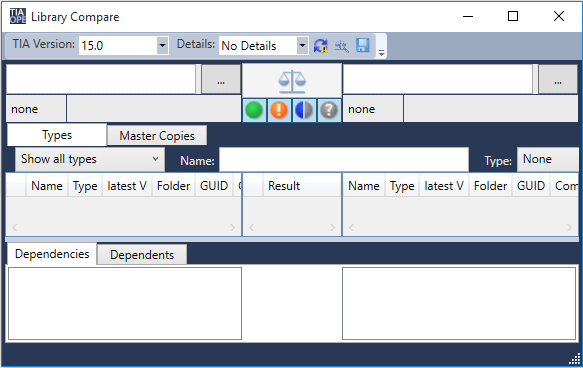
11. TIA Openness Library Compare
 (12/19/2018) [109749141]

   The "Library Compare" tool gives you the opportunity to compare
   libraries.
For products:6ES7822-0A.04-.., 6ES7822-1..04-..,...

   more
   => https://support.industry.siemens.com/cs/ww/en/view/109749141/news
------------------------------------------------------------------------

  
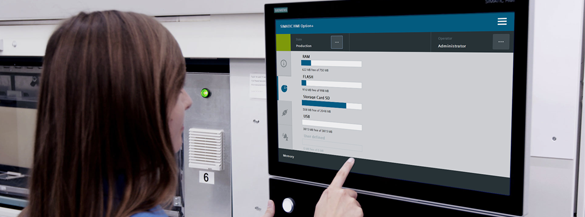
13. SIMATIC HMI Option+
 (12/20/2018) [109754400]

   SIMATIC HMI Option+ offers you completely new functions for your
   SIMATIC HMI Comfort Panel. Apart from the configuration of the
   device interfaces from Runtime, the new application also offers you
   possibilities for user identification via RFID card, functions for
   monitoring remote access or simplified handling of OPC UA
   certificates.
For products:6AV2124-1MC01-0AX0,
   6AV2124-0JC01-0AX0,...

   more
   => https://support.industry.siemens.com/cs/ww/en/view/109754400/news
------------------------------------------------------------------------

 
1. Toolbox for HMI Projects
 (12/3/2018) [106226404]

   It is often the small tools that make work easier. This entry
   contains some useful tools that you can easily integrate into your
   HMI configuration via libraries. For example, a stopwatch, a file
   explorer or also a calculator, .... The toolbox for HMI projects
   currently offers 28 tools already and is continuously
   expanded.
For
   products:6AV210.-....4-0;6AV2104-....4-0;6AV2105-....3

   more
   => https://support.industry.siemens.com/cs/ww/en/view/106226404/news
------------------------------------------------------------------------

 
4. Monitoring of Machine Vibration Variables with a SIPLUS CMS1200 SM
   1281 Condition Monitoring System
 (12/7/2018) [109480750]

   To protect a machine efficiently against mechanical damage during
   operation and detect such damages at an early stage, the machine
   has to be monitored permanently.
For
   products:6AT8007-1AA10-0AA0

   more
   => https://support.industry.siemens.com/cs/ww/en/view/109480750/news
------------------------------------------------------------------------


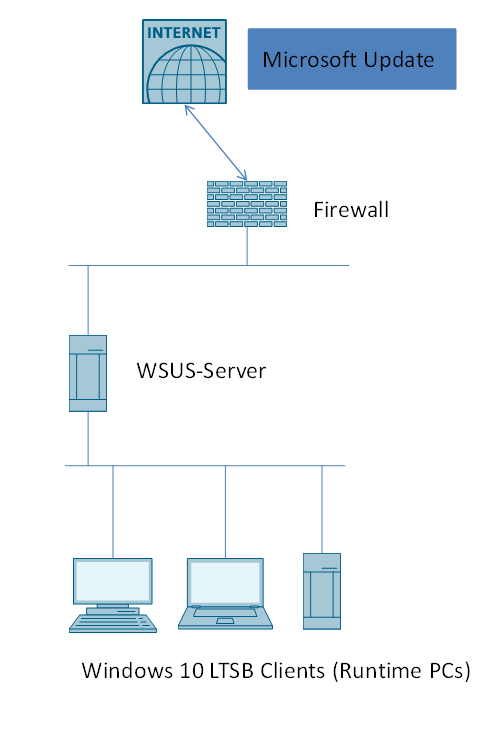
7. Handling of Microsoft updates 
 (12/3/2018) [109754089]

   This application example describes how to configure the Microsoft
   Windows Server Update Service (WSUS) and set up the Windows Clients
   for receiving Windows updates via the WSUS.
For
   products:6AV63.1-....7-0..., 6AV63.1-....6-2...,...

   more
   => https://support.industry.siemens.com/cs/ww/en/view/109754089/news
------------------------------------------------------------------------

------------------------------------------------------------------------
#  DOWNLOAD
------------------------------------------------------------------------ 

18. Firmware Update SIPLUS CMS1200 SM 1281
 (12/10/2018) [109755629]

   With product release ES03 and higher it is possible to update or
   downgrade the firmware of the module.
For
   products:6AT8007-1AA10-0AA0

   more
   => https://support.industry.siemens.com/cs/ww/en/view/109755629/news
------------------------------------------------------------------------  

------------------------------------------------------------------------
#  FAQ
------------------------------------------------------------------------

2. Additions to TIA Portal Openness V15.1 
 (12/27/2018) [109761281]

   Here we provide additional information about TIA Portal Openness
   V15.1.
For products:6ES7822-0AA05-0YA5, 6ES7822-1AA05-0YA5,...


   more
   => https://support.industry.siemens.com/cs/ww/en/view/109761281/news
------------------------------------------------------------------------
3. When working with TIA Portal, why is the warning message 
   'Consumption of application resources (0024:000004)' displayed? 
 (12/27/2018) [109762928]

   The warning message appears in the operating system MS Windows 10
   Version 1803.
For products:6ES7822-0A.04-..,

   6ES7822-1..04-..,...

   more
   => https://support.industry.siemens.com/cs/ww/en/view/109762928/news
------------------------------------------------------------------------  
27. How can you read input words in the address range from 9999 to 
   65535 with the SIMATIC S7-1200/S7-1500 via Modbus RTU? 
 (12/5/2018) [109474481]

   In STEP 7 V14 (TIA Portal) and higher the "Modbus_Master"
   instruction provides with V2.4 and higher for SIMATIC
   S7-1200/S7-1500 the option of reading out the extended address
   range (9999 - 65535) of input words (function code 04) of a Modbus
   slave.
For products:6AG1241-1CH30-5XB1, 6AG1214-1AG40-4XB0,...


   more
   => https://support.industry.siemens.com/cs/ww/en/view/109474481/news
------------------------------------------------------------------------  
27. Why does the TIA Portal V14 SP1 crash sporadically after
   side-by-side installation of TIA Portal V15 Update 4?
 (12/12/2018) [109762752]

   When you install the TIA Portal versions V14 SP1 and V15 Upd 4
   simultaneously, there are from time to time crashes. The crashes
   can be prevented by doing a repair installation of WinCC V14
   SP1.
For products:6AV210.-....4-0, 6AV210.-....5-0

   more
   => https://support.industry.siemens.com/cs/ww/en/view/109762752/news
------------------------------------------------------------------------  
30. What does Technical Support need to know when you make queries
   about SIMATIC STEP 7 software?
 (12/11/2018) [109737884]

   Information and details required when submitting queries to Siemens
   Technical Support
For products:6ES7822-0AA00-0YA0,
   6ES7822-1..03-..,...

   more
   => https://support.industry.siemens.com/cs/ww/en/view/109737884/news
------------------------------------------------------------------------ 
 
------------------------------------------------------------------------
#  Manual
------------------------------------------------------------------------ 

34. MindApp Manage MyMachines /Remote - Application Examples - October
   2018
 (12/10/2018) [109759396]

   10/2018, Application examples, A5E45211403B AB
For
   products:9AC2422-2MJ11-6ND0, 6FC6121-4AA10-0YA0

   more
   => https://support.industry.siemens.com/cs/ww/en/view/109759396/news
------------------------------------------------------------------------  

------------------------------------------------------------------------
#  Product note
------------------------------------------------------------------------  

50. Status change for SIMATIC HMI products 
 (12/3/2018) [109486162]

   This product notification provides information about upcoming
   status changes to SIMATIC HMI products because our SIMATIC products
   are subject to PLM (Product Lifecycle Management).
For

   products:6AV6545-0DB10-0AX0, 6ES7272-1BA10-0YA1,...

   more
   => https://support.industry.siemens.com/cs/ww/en/view/109486162/news
------------------------------------------------------------------------
4. Download for SCALANCE XB-200, XC-200, XP-200, XF-200BA and XR-300WG
   Firmware V4.1
 (12/20/2018) [109762982]

   Firmware V4.1 for SCALANCE XB-200, XC-200, XP-200, XF-200BA and
   XR-300WG is hereby made available for download.
For
   products:6GK5213-3BF00-2AB2, 6GK5216-0BA00-2AB2,...

   more
   => https://support.industry.siemens.com/cs/ww/en/view/109762982/news
------------------------------------------------------------------------  

Monday, December 3, 2018

UPDATE 1 DEC 2018


------------------------------------------------------------------------
#  Application example
------------------------------------------------------------------------ 

5. Time-controlled lighting with LOGO! 8 and LOGO! CMR (Set 1)
 (11/7/2018) [109063024]

   The lighting is controlled by LOGO! 8. This is connected to a LOGO!
   CMR. By selecting different operating modes, you decide whether the
   lighting is switched on or off at sunset or sunrise. In addition,
   it is possible to manually enter a switch-on or switch-off time for
   the lighting via SMS or locally onsite.
For
   products:6ED1055-4MH00-0BA1, 6ED1052-2FB00-0BA8,...

   more
   => https://support.industry.siemens.com/cs/ww/en/view/109063024/news
------------------------------------------------------------------------  


7. SIMATIC PN/CAN LINK – Configuring 'CAN transparent' operating mode
 (11/19/2018) [109760971]

   This application example shows the operation of an S7-1200
   controller and two PN/CAN LINK network transitions, which are
   connected to each other via PROFINET. The following is explained:
   • How to configure messages and to assign parameters to tags
   • How to insert blocks and go online
 
For products:6BK1620-0AA00-0AA0, 6ES7822-0A.05-..,...

   more
   => https://support.industry.siemens.com/cs/ww/en/view/109760971/news
------------------------------------------------------------------------  

Video thumbnail for Commissioning_of_the_application_example_HMI_Template_Suite

4. SIMATIC HMI Control Panels - Innovative Design and Operation
 (11/23/2018) [91174767]

   Give your machine an unmistakable face and turn the interface
   between machine and human into the trademark of your automation
   solution.
For products:6AV2124-1MC01-0AX0,
   6AV2181-8XP00-0AX0,...

   more
   => https://support.industry.siemens.com/cs/ww/en/view/91174767/news
------------------------------------------------------------------------  


1. Network and Communication diagnostics
 (11/5/2018) [21566216]

   To make diagnostic in automation technology, there are numerous
   different procedures. This document gives you an overview of the
   options available for diagnosing a SIMATIC controller or a SCALANCE
   network device, networks and communication.
For
   products:6GK5302-7GD00-4GA3, 6GK5213-3BF00-2AB2,...

   more
   => https://support.industry.siemens.com/cs/ww/en/view/21566216/news
------------------------------------------------------------------------  


6. Library of general functions (LGF) for STEP 7 (TIA Portal) and
   S7-1200 / S7-1500
 (11/6/2018) [109479728]

   The library "LGF (Library of general functions)" contains
   additional functions for STEP 7 (TIA Portal).
For
   products:6ES7822-1..05-..

   more
   => https://support.industry.siemens.com/cs/ww/en/view/109479728/news
------------------------------------------------------------------------ 


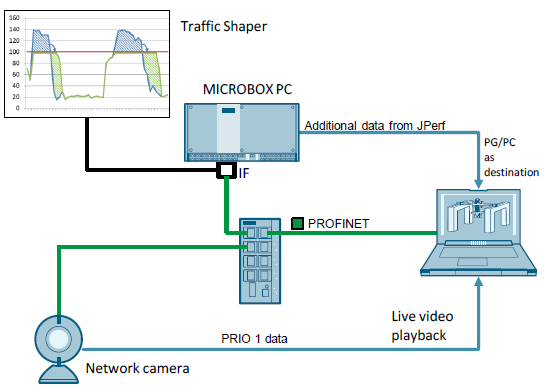
7. Traffic Shaper
 (11/7/2018) [109750661]

   To prevent peak loads and data loss, the Traffic Shaper is a
   helpful tool. Through the Traffic Shaper, data packets originating
   from a network card can be limited according to predetermined
   maximum values
For products:6AG4112-2....-....,
   6AG4104-2DP32-2FX0,...

   more
   => https://support.industry.siemens.com/cs/ww/en/view/109750661/news
------------------------------------------------------------------------  

------------------------------------------------------------------------
#  FAQ
------------------------------------------------------------------------

10. How do you request a new temporary password if the password from 
   the ready-to-download e-mail from OSD has expired? 
 (11/28/2018) [101095472]

   You can request a new temporary password via the Online Software
   Delivery web page.
For products:3ZS1322-5CC10-0YL5,

   3ZS1314-5CC10-4YA5,...

   more
   => https://support.industry.siemens.com/cs/ww/en/view/101095472/news
------------------------------------------------------------------------
11. How do you log in to download products after receiving an e-mail 
   from OSD indicating that a download is ready? 
 (11/28/2018) [109476151]

   After receiving an e-mail indicating that a download is ready you
   log in to Online Software Delivery (OSD) with or without Industry
   Mall Account to download your prepared products.
For

   products:3ZS1322-5CC10-0YL5, 3ZS1314-5CC10-4YA5,...

   more
   => https://support.industry.siemens.com/cs/ww/en/view/109476151/news
------------------------------------------------------------------------  
14. How do you diagnose a rolling bearing with the SM 1281 taking into 
   account the bearing data and fault frequencies? 
 (11/21/2018) [109761652]

   The SM 1281 can analyze the bearing components of a rolling bearing
   in such a way that you can obtain information about how urgent it
   might be to make replacements. For this the SM 1281 needs
   bearing-related data as described in this entry.
For

   products:6AT8007-1AA10-0AA0

   more
   => https://support.industry.siemens.com/cs/ww/en/view/109761652/news
------------------------------------------------------------------------  
63. Where do you procure the current trial software for the TIA Portal
   STEP 7 V15, WinCC V15 and Startdrive V15 and V15.1?
 (11/12/2018) [109753089]

   Free trial versions of TIA Portal components V15 and V15.1 are
   available from this web page.
For products:6AV2100-0AA05-0AA7,
   6AV2102-0AA05-0AA7,...

   more
   => https://support.industry.siemens.com/cs/ww/en/view/109753089/news
------------------------------------------------------------------------ 
 
------------------------------------------------------------------------
#  Manual
------------------------------------------------------------------------ 

61. SIMATIC S7-1200/S7-1500 F-CPUs
 (11/26/2018) [109478599]

   11/2018, Product Information, A5E35635424-AG
For
   products:6ES7513-1AL00-0AB0, 6ES7511-1AK00-0AB0,...

   more
   => https://support.industry.siemens.com/cs/ww/en/view/109478599/news
------------------------------------------------------------------------  
27. SIWAREX WP251
 (11/27/2018) [109762579]

   11/2018, Operating Instructions, A5E37203357-AD,
   A5E37203357
For products:7MH4960-6AA01

   more
   => https://support.industry.siemens.com/cs/ww/en/view/109762579/news
------------------------------------------------------------------------  
27. SIMATIC Ident Configuration Guide
 (11/22/2018) [67384964]

   10/2018, Operating Instructions
For products:6GT2821-6AC40,
   6GT2091-4LH20,...

   more
   => https://support.industry.siemens.com/cs/ww/en/view/67384964/news
------------------------------------------------------------------------  
67. SIMATIC HMI Quick Install Guide Comfort Panels V2
 (11/5/2018) [109750954]

   09/2018, Getting Started, A5E41474422-AB
For
   products:6AV2124-0QC02-0AX1, 6AV2124-0UC02-0AX1,...

   more
   => https://support.industry.siemens.com/cs/ww/en/view/109750954/news
------------------------------------------------------------------------
68. SIMATIC S7-1500/S7-1200/S7-400/S7-300 Parameters of technology
   objects in TIA Portal Openness
 (10/22/2018) [109744932]

   10/2018, Product Information, A5E40958798-AB
For
   products:6ES7822-1..03-..

   more
   => https://support.industry.siemens.com/cs/ww/en/view/109744932/news
------------------------------------------------------------------------ 

------------------------------------------------------------------------
#  Product note
------------------------------------------------------------------------  
 
67. Online Software Delivery - What’s new?
 (11/29/2018) [109748903]

   You are provided a summary of the new features and functions for
   the Online Software Delivery platform. We are also including a more
   detailed description for select OSD features.

   more
   => https://support.industry.siemens.com/cs/ww/en/view/109748903/news
------------------------------------------------------------------------ 


Thursday, November 1, 2018

UPDATE 1 NOV 2018

------------------------------------------------------------------------
#  Application example
------------------------------------------------------------------------ 


2. Building Automation: House Control with LOGO! 8 and Touch Panel
   KTP700 Basic (LOGO! Set 10)
 (10/26/2018) [68585344]

   The house control application example (set 9) is expanded by a
   SIMATIC HMI Touch Panel KTP700 Basic. House functions can easily be
   controlled and monitored with the central Touch Panel. The color
   display of the touch panel can be modified individually.
For
   products:6GK7177-1MA10-0AA0, 6AV2100-0AA01-0AA0,...

   more
   => https://support.industry.siemens.com/cs/ww/en/view/68585344/news
------------------------------------------------------------------------


3. Building Automation: House Control with LOGO! 8 and Master-Slave
   Communication (LOGO! Set 9)
 (10/26/2018) [64143308]

   The LOGO! 8 controller together with further LOGO! 8 controllers is
   used to control and monitor various functions in houses or other
   buildings. A smartphone can be used to monitor and control the
   house functions via WLAN.
For products:6GK7177-1MA10-0AA0,
   6ED1055-1NB10-0BA2,...

   more
   => https://support.industry.siemens.com/cs/ww/en/view/64143308/news
------------------------------------------------------------------------


4. Building Automation: House Control with LOGO! 8 and Weather Sensors
   (LOGO! Set 11)
 (10/26/2018) [68585346]

   With LOGO! 8, data can be exchanged between several LOGO! modules
   via network communicaiton. In the application, a weather station is
   connected to an existing house automation with a LOGO! 8 and a
   Touch Panel. Depending in the weather data, various house functions
   are controlled automatically and weather warnings are
   generated.
For products:6GK7177-1MA10-0AA0,
   6AV2100-0AA01-0AA0,...

   more
   => https://support.industry.siemens.com/cs/ww/en/view/68585346/news
------------------------------------------------------------------------ 


6. S7 Energy Efficiency-Monitor for machines
 (10/26/2018) [109753230]

   Standardized efficiency evaluation of machines, including
   efficiency log. The S7 energy efficiency monitor for machines
   allows you to easily evaluate the energy efficiency of your machine
   according to the measuring instruction VDMA 34179. Use the
   ready-made HMI visualization to efficiently show the energy data of
   your machine.
For products:6ES7211-1HD30-0XB0,
   6ES7217-1AG40-0XB0,...

   more
   => https://support.industry.siemens.com/cs/ww/en/view/109753230/news
------------------------------------------------------------------------  

5. Library for PROFINET data records
 (10/19/2018) [109753067]

   The "LPNDR" block library includes several function blocks. With
   these you can read various device and status information from a
   PROFINET device and describe parameters.
For
   products:6GK5302-7GD00-4GA3, 6ES7134-6GD00-0BA1,...

   more
   => https://support.industry.siemens.com/cs/ww/en/view/109753067/news
------------------------------------------------------------------------  


7. SIMATIC Machine Simulator Virtual commissioning of machines Getting
   Started
 (10/19/2018) [109758943]

   This Getting Started helps you to become familiar with essential
   steps for performing virtual commissioning with the SIMATIC Machine
   Simulator based on a specific application example.
For
   products:6ES7822-1AA05-0XC2, 6ES7822-1AA05-0XC5,...

   more
   => https://support.industry.siemens.com/cs/ww/en/view/109758943/news
------------------------------------------------------------------------  

------------------------------------------------------------------------
#  DOWNLOAD
------------------------------------------------------------------------ 

16. TRIAL Download SIMATIC S7-PLCSIM Advanced V2.0 SP1
 (10/26/2018) [109758848]

   The Trial download of the V2.0 SP1 of SIMATIC S7-PLCSIM Advanced is
   available effective immediately (October 26, 2018).
For
   products:6ES7823-1FA00-0YL5, 6ES7823-1FE00-0YL5,...

   more
   => https://support.industry.siemens.com/cs/ww/en/view/109758848/news
------------------------------------------------------------------------
17. SIMATIC STEP 7 Safety Advanced V15.1 – TRIAL
 (10/26/2018) [109759618]

   SIMATIC STEP 7 Safety / Advanced V15.1, the high-performance add-on
   package for programming the fail-safe S7 controllers for the
   Totally Integrated Automation Portal V15.1.
For
   products:6ES7833-1FC00-0YX2, 6ES7833-1FC00-0YM2,...

   more
   => https://support.industry.siemens.com/cs/ww/en/view/109759618/news
------------------------------------------------------------------------
18. SIMATIC STEP 7 and WinCC V15.1 TRIAL Download
 (10/26/2018) [109761045]

   SIMATIC STEP 7 and WinCC V15.1 TRIAL Download
For
   products:6ES7822-0A.05-.., 6ES7822-1..05-..,...

   more
   => https://support.industry.siemens.com/cs/ww/en/view/109761045/news
------------------------------------------------------------------------
19. STEP 7 V5.6 SP1 / STEP 7 Professional 2017 SR1 Trial Download
 (10/26/2018) [109761679]

   Free trial versions of STEP 7 V5.6 SP1 / STEP 7 Professional 2017
   SR1 are available from this web page.
For products:6ES7810-4C,
   6ES7810-4CC11-0JA5,...

   more
   => https://support.industry.siemens.com/cs/ww/en/view/109761679/news
------------------------------------------------------------------------  
11. Firmware update for CPU 1214C, DC/DC/RELAIS, 14DI/10DO/2AI
 (10/4/2018) [107539979]

   Firmware update for CPU 1214C, DC/DC/RELAIS, 14DI/10DO/2AI
   6ES7214-1HG40-0XB0
For products:6AG1214-1HG40-4XB0,
   6ES7214-1HG40-0XB0,...

   more
   => https://support.industry.siemens.com/cs/ww/en/view/107539979/news
------------------------------------------------------------------------
12. Firmware update for SM 1238 Energy Meter 480 VAC
 (9/18/2018) [109760770]

   This entry contains all firmware versions for the SM 1238 Energy
   Meter 480 VAC.
 
For products:6ES7238-5XA32-0XB0

   more
   => https://support.industry.siemens.com/cs/ww/en/view/109760770/news
------------------------------------------------------------------------ 
------------------------------------------------------------------------
#  FAQ
------------------------------------------------------------------------

30. When changes are made in the standard user program, why do you have 
   to load in the STOP mode with fail-safe S7-1200F/S7-1500F CPUs? 
 (10/24/2018) [109761403]

   The following three scenarios describe the cause and remedy for
   avoiding loading in the STOP mode.
For

   products:6ES7515-2FM00-0AB0, 6ES7516-3FN00-0AB0,...

   more
   => https://support.industry.siemens.com/cs/ww/en/view/109761403/news
------------------------------------------------------------------------  
21. How do you change the SUS contract data in OSD (Online Software
   Delivery)?
 (10/16/2018) [109760477]

   Taking an example we will show you how to change the SUS contract
   data in OSD.
For products:3ZS1322-5CC10-0YL5,
   3ZS1314-5CC10-4YA5,...

   more
   => https://support.industry.siemens.com/cs/ww/en/view/109760477/news
------------------------------------------------------------------------  
19. How do you evaluate the 'RUN / STOP' mode of the CPU via an HMI
   operator panel?
 (10/2/2018) [109481628]

   Evaluating the RUN / STOP mode of the CPU via the system function
   "GetPLCMode".
For products:6AV2124-1MC01-0AX0,
   6AV2124-0JC01-0AX0,...

   more
   => https://support.industry.siemens.com/cs/ww/en/view/109481628/news
------------------------------------------------------------------------  

------------------------------------------------------------------------
#  Manual
------------------------------------------------------------------------ 

42. Readme SIMATIC S7-PLCSIM Advanced V2.0 SP1
 (10/25/2018) [109739154]

   10/2018, Readme, A5E38332429-AE
For
   products:6ES7823-1FA01-0YA5, 6ES7823-1FA01-0YE5,...

   more
   => https://support.industry.siemens.com/cs/ww/en/view/109739154/news
------------------------------------------------------------------------
43. SIMATIC PROFINET PROFINET with STEP 7 V15
 (10/17/2018) [49948856]

   10/2018, Function Manual, A5E03444486-AJ
For
   products:6AV2124-1MC01-0AX0, 6GK5302-7GD00-4GA3,...

   more
   => https://support.industry.siemens.com/cs/ww/en/view/49948856/news
------------------------------------------------------------------------  
66. Operating Instructions (compact) LOGO! ICL230
 (10/11/2018) [109761345]

   09.2018, Compact Operating Instructions, P10070.0001
For
   products:LOGO! ICL230

   more
   => https://support.industry.siemens.com/cs/ww/en/view/109761345/news
------------------------------------------------------------------------  

------------------------------------------------------------------------
#  Product note
------------------------------------------------------------------------ 

72. Delivery release TIA Portal V15.1
 (10/26/2018) [109758794]

   Your gateway to automation in the Digital Enterprise
For
   products:6AV6362-2AB00-0AH0, 6AV6362-2AB00-0BB0,...

   more
   => https://support.industry.siemens.com/cs/ww/en/view/109758794/news
------------------------------------------------------------------------
73. Delivery Release SIMATIC STEP 7 Professional / Basic V15.1
 (10/26/2018) [109758795]

   Controller software of the new generation
For
   products:6ES7810-5CC04-0YY2, 6ES7822-0AA00-0YL0,...

   more
   => https://support.industry.siemens.com/cs/ww/en/view/109758795/news
------------------------------------------------------------------------
74. Delivery release STEP 7 Safety Basic / Advanced V15.1
 (10/26/2018) [109759617]

   Delivery release for SIMATIC STEP 7 Safety Basic / Advanced V15.1,
   the high-performance add-on package for programming of fail-safe S7
   controllers for the Totally Integrated Automation Portal V15.1.

 
For products:6ES7833-1FC00-0YX2, 6ES7833-1FC00-0YM2,...

   more
   => https://support.industry.siemens.com/cs/ww/en/view/109759617/news
------------------------------------------------------------------------  
79. Product information on LOGO! 6 spare parts availability
 (10/22/2018) [109761232]

   With immediate effect, LOGO! 6 basic devices and expansion modules
   are available as spare parts only.
For
   products:6ED1052-2CC01-0BA6, 6ED1052-2MD00-0BA6,...

   more
   => https://support.industry.siemens.com/cs/ww/en/view/109761232/news
------------------------------------------------------------------------  
58. SM1238 Energy Meter 480VAC - Enhanced use cases
 (10/9/2018) [109760717]

   The updated Energy Meter offers additional uses cases with the
   Hardware Change FS02. The article number is unchanged.
For
   products:6ES7238-5XA32-0XB0

   more
   => https://support.industry.siemens.com/cs/ww/en/view/109760717/news
------------------------------------------------------------------------