------------------------------
# Application example
------------------------------

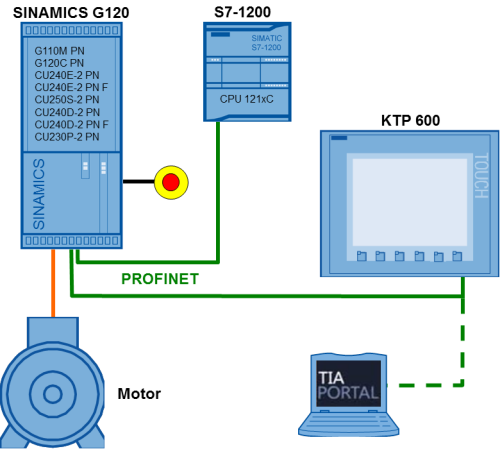
6. PN/BACnet LINK – Configuring data exchange
(8/29/2018) [109757273]
For products:6ES7822-0AA00-0YL0, 6ES7214-1AG40-0XB0,...
more
=> https://support.industry.
------------------------------
(8/29/2018) [109757273]
For products:6ES7822-0AA00-0YL0, 6ES7214-1AG40-0XB0,...
more
=> https://support.industry.
------------------------------

3. Monitoring of Machine Vibration Variables with a SIPLUS CMS1200 SM
1281 Condition Monitoring System
(8/24/2018) [109480750]
To protect a machine efficiently against mechanical damage during
operation and detect such damages at an early stage, the machine
has to be monitored permanently.
For
products:6AT8007-1AA10-0AA0
more
=> https://support.industry.
------------------------------
1281 Condition Monitoring System
(8/24/2018) [109480750]
To protect a machine efficiently against mechanical damage during
operation and detect such damages at an early stage, the machine
has to be monitored permanently.
For
products:6AT8007-1AA10-0AA0
more
=> https://support.industry.
------------------------------

1. Overview: Diagnostic tools at SIMATIC and SCALANCE
(8/9/2018) [21566216]
To make diagnostic in automation technology, there are numerous
different procedures. This document gives you an overview of the
options available for diagnosing a SIMATIC controller or a SCALANCE
network device.
more
=> https://support.industry.
------------------------------
(8/9/2018) [21566216]
To make diagnostic in automation technology, there are numerous
different procedures. This document gives you an overview of the
options available for diagnosing a SIMATIC controller or a SCALANCE
network device.
more
=> https://support.industry.
------------------------------
2. Creating and using user-defined web pages on S7-1200 / S7-1500
(8/13/2018) [68011496]
How to program web pages, to control your plant
For
products:6AG1214-1AG40-4XB0, 6ES7513-1AL00-0AB0,...
more
=> https://support.industry.
------------------------------
(8/13/2018) [68011496]
How to program web pages, to control your plant
For
products:6AG1214-1AG40-4XB0, 6ES7513-1AL00-0AB0,...
more
=> https://support.industry.
------------------------------
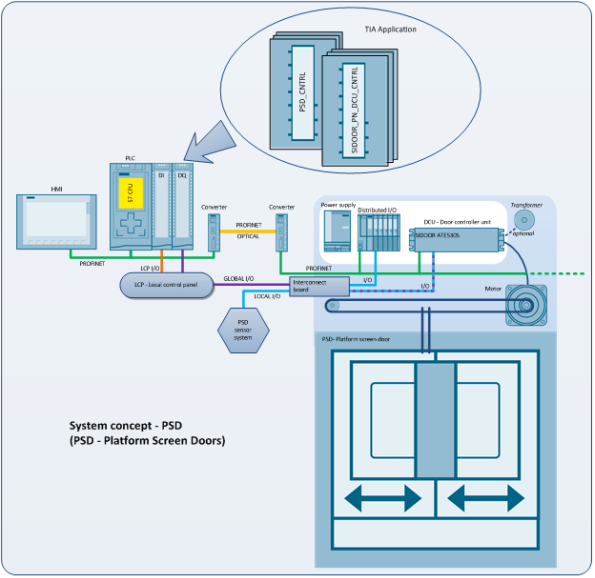
3. Safety-oriented automation of platform screen doors with SIDOOR
ATE530S PROFINET EC door drive and S7-1200 / S7-1500 CPU via TIA
Portal
(8/13/2018) [109477186]
SIMATIC S7-1200 / S7-1500 automation example for administration,
diagnostics, parameter setting and control of the SIDOOR ATE530S
for platform screen doors on PROFINET.
For
products:6FB1231-3BM10-7AT0
more
=> https://support.industry.
------------------------------

4. Synchronization of two-panel and independent platform screen doors
with SIDOOR ATE530S PROFINET EC door drive and S7-1200 / S7-1500
CPU via TIA Portal
(8/13/2018) [109480495]
SIMATIC S7-1200 / S7-1500 automation example for administration,
diagnostics, parameter setting, control and synchronisation of the
SIDOOR ATE530S for PSG - platform screen gates on PROFINET.
For
products:6FB1231-3BM10-7AT0
more
=> https://support.industry.
------------------------------

5. MQTT Publisher for SIMATIC CPU
(8/16/2018) [109748872]
The “Message Queue Telemetry Transport” is a simple protocol on
TCP/IP level. It is suitable for messaging between devices with
minimum functionality and for transmission via unreliable networks.
With the function block from this application example, the MQTT
protocol is implemented into a SIMATIC S7-1500, SIMATIC S7-1200 and
SIMATIC S7-300.
For products:6ES7317-7TK10-0AB0,
6ES7317-2FJ10-0AB0,...
more
=> https://support.industry.
------------------------------
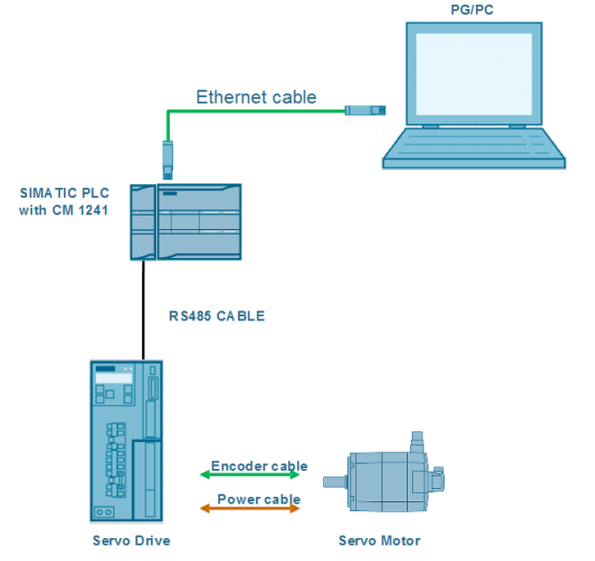
7. Acyclic communication between SIMATIC S7-1200 with SINAMICS V90 PTI
via Modbus RTU and DS47
(8/13/2018) [109758557]
For products:SINAMICS V90 PTI
more
=> https://support.industry.
------------------------------
via Modbus RTU and DS47
(8/13/2018) [109758557]
For products:SINAMICS V90 PTI
more
=> https://support.industry.
------------------------------
------------------------------
# DOWNLOAD
------------------------------
# DOWNLOAD
------------------------------
14. SIMATIC PN/CAN LINK Firmware V1.0.1
(8/13/2018) [109759816]
When firmware is updated, it must always be updated to the latest
version available for the respective article number.
For
products:6BK1620-0AA00-0AA0
more
=> https://support.industry.
------------------------------
(8/13/2018) [109759816]
When firmware is updated, it must always be updated to the latest
version available for the respective article number.
For
products:6BK1620-0AA00-0AA0
more
=> https://support.industry.
------------------------------
9. Firmware update V6.1.3 for SCALANCE XR-500
(8/16/2018) [109759986]
Firmware update V6.1.3 is hereby available to download for SCALANCE
XR-500.
For products:6GK5528-0AA00-2AR2,
6GK5526-8GS00-2AR2,...
more
=> https://support.industry.
------------------------------
10. Firmware update V6.1.3 for SCALANCE XM-400
(8/16/2018) [109759987]
Firmware update V6.1.3 is hereby available to download for SCALANCE
XM-400.
For products:6GK5416-4GS00-2AM2,
6GK5408-8GS00-2AM2,...
more
=> https://support.industry.
------------------------------
(8/16/2018) [109759986]
Firmware update V6.1.3 is hereby available to download for SCALANCE
XR-500.
For products:6GK5528-0AA00-2AR2,
6GK5526-8GS00-2AR2,...
more
=> https://support.industry.
------------------------------
10. Firmware update V6.1.3 for SCALANCE XM-400
(8/16/2018) [109759987]
Firmware update V6.1.3 is hereby available to download for SCALANCE
XM-400.
For products:6GK5416-4GS00-2AM2,
6GK5408-8GS00-2AM2,...
more
=> https://support.industry.
------------------------------
10. Firmware Update for CM 1243-2
(8/7/2018) [109759715]
Firmware update for CM 1243-2 communication module AS-Interface
master for SIMATIC S7-1200..
For products:3RK7243-2AA30-0XB0
more
=> https://support.industry.
------------------------------
(8/7/2018) [109759715]
Firmware update for CM 1243-2 communication module AS-Interface
master for SIMATIC S7-1200..
For products:3RK7243-2AA30-0XB0
more
=> https://support.industry.
------------------------------
14. Handling programs for authorizing or licensing SIMATIC products.
(7/31/2018) [114358]
This page includes the latest versions of the various handling
programs for authorizing or licensing SIMATIC products.
For
products:6ES5894-0MA62, 6ES5894-0MA04-2UL0,...
more
=> https://support.industry.
------------------------------
(7/31/2018) [114358]
This page includes the latest versions of the various handling
programs for authorizing or licensing SIMATIC products.
For
products:6ES5894-0MA62, 6ES5894-0MA04-2UL0,...
more
=> https://support.industry.
------------------------------
------------------------------
# FAQ
------------------------------
# FAQ
------------------------------
13. Tips and tricks for creating scripts in WinCC (TIA Portal)
(8/22/2018) [57132412]
Practical tips for programming scripts for WinCC Comfort and WinCC
Advanced in the programming language VBScript.
For
products:6AV210.-....2-0, 6AV210.-....3-0,...
more
=> https://support.industry.
------------------------------
(8/22/2018) [57132412]
Practical tips for programming scripts for WinCC Comfort and WinCC
Advanced in the programming language VBScript.
For
products:6AV210.-....2-0, 6AV210.-....3-0,...
more
=> https://support.industry.
------------------------------
20. Which SIMATIC HMI operator panels does Siemens currently offer for
hazardous areas with potentially explosive atmosphere (Ex2/22)?
(8/29/2018) [291285]
SIMATIC HMI operator panels available for hazardous areas with
potentially explosive atmosphere (Ex2/22)
For
products:6AV6545-0DB10-0AX0, 6AV2124-1MC01-0AX0,...
more
=> https://support.industry.
------------------------------
hazardous areas with potentially explosive atmosphere (Ex2/22)?
(8/29/2018) [291285]
SIMATIC HMI operator panels available for hazardous areas with
potentially explosive atmosphere (Ex2/22)
For
products:6AV6545-0DB10-0AX0, 6AV2124-1MC01-0AX0,...
more
=> https://support.industry.
------------------------------
------------------------------
# Product note
------------------------------
# Product note
------------------------------
46. Product discontinuation: SITOP power supply in SIMATIC design
S7-200
(8/22/2018) [109759817]
Product discontinuation (P.M. 410) for the SITOP power supply in
SIMATIC design S7-200 (6EP1332-1SH31) is scheduled to take place on
October 1, 2018.
For products:6EP1332-1SH71, 6EP1332-1SH31
more
=> https://support.industry.
------------------------------
S7-200
(8/22/2018) [109759817]
Product discontinuation (P.M. 410) for the SITOP power supply in
SIMATIC design S7-200 (6EP1332-1SH31) is scheduled to take place on
October 1, 2018.
For products:6EP1332-1SH71, 6EP1332-1SH31
more
=> https://support.industry.
------------------------------
47. Unrestricted sales and delivery release SCALANCE SC-600
(8/16/2018) [109759988]
The SCALANCE SC-600 Industrial Security Appliances are released for
sale. Start of delivery 01/2018.
For products:6GK5632-2GS00-2AC2, 6GK5636-2GS00-2AC2,...
more
=> https://support.industry.
------------------------------
48. Sales and delivery release for SCALANCE XB-100
(8/16/2018) [109759990]
SIMATIC NET has expanded its Industrial Ethernet switches to
include the SCALANCE XB-100 product line. The products have now
been released by PD PA CI for sale and delivery.
For
products:6GK5108-2BD00-2AB2, 6GK5112-0BA00-2AB2,...
more
=> https://support.industry.
------------------------------
49. Sales / delivery release for 32 GB Service USB Flash Drive
(8/16/2018) [109758763]
With immediate effect, the 32 GB Service USB Flash Drive replaces
the 16 GB Service USB Flash Drive.
For
products:6AV7672-8JD02-0AA0, 6ES7648-6XA11-0YA0
more
=> https://support.industry.
------------------------------
50. USB flash drive, 32 GB, sales/delivery release
(8/16/2018) [109759104]
The 32 GB USB flash drive (6AV6881-0AS42-0AA0), is replacing the
16 GB USB flash drive (6ES7648-0DC60-0AA0), effective
immediately.
For products:6ES7648-0DC60-0AA0,
6AV6881-0AS42-0AA0
more
=> https://support.industry.
------------------------------
(8/16/2018) [109759988]
The SCALANCE SC-600 Industrial Security Appliances are released for
sale. Start of delivery 01/2018.
For products:6GK5632-2GS00-2AC2, 6GK5636-2GS00-2AC2,...
more
=> https://support.industry.
------------------------------
48. Sales and delivery release for SCALANCE XB-100
(8/16/2018) [109759990]
SIMATIC NET has expanded its Industrial Ethernet switches to
include the SCALANCE XB-100 product line. The products have now
been released by PD PA CI for sale and delivery.
For
products:6GK5108-2BD00-2AB2, 6GK5112-0BA00-2AB2,...
more
=> https://support.industry.
------------------------------
49. Sales / delivery release for 32 GB Service USB Flash Drive
(8/16/2018) [109758763]
With immediate effect, the 32 GB Service USB Flash Drive replaces
the 16 GB Service USB Flash Drive.
For
products:6AV7672-8JD02-0AA0, 6ES7648-6XA11-0YA0
more
=> https://support.industry.
------------------------------
50. USB flash drive, 32 GB, sales/delivery release
(8/16/2018) [109759104]
The 32 GB USB flash drive (6AV6881-0AS42-0AA0), is replacing the
16 GB USB flash drive (6ES7648-0DC60-0AA0), effective
immediately.
For products:6ES7648-0DC60-0AA0,
6AV6881-0AS42-0AA0
more
=> https://support.industry.
------------------------------
43. Online Software Delivery - What’s new?
(7/25/2018) [109748903]
You are provided a summary of the new features and functions for
the Online Software Delivery platform. We are also including a more
detailed description for select OSD features.
more
=> https://support.industry.
------------------------------
44. Download firmware SCALANCE W700 IEEE 802.11n V6.3.0
(8/15/2018) [109759695]
This firmware update V6.3.0 can be used for SCALANCE W700 IEEE
802.11n products and replaces the older firmware version
V6.2.2
For products:6GK5748-1FC00-0AB0, 6GK5788-2GD00-0TA0,...
more
=> https://support.industry.
------------------------------
(7/25/2018) [109748903]
You are provided a summary of the new features and functions for
the Online Software Delivery platform. We are also including a more
detailed description for select OSD features.
more
=> https://support.industry.
------------------------------
44. Download firmware SCALANCE W700 IEEE 802.11n V6.3.0
(8/15/2018) [109759695]
This firmware update V6.3.0 can be used for SCALANCE W700 IEEE
802.11n products and replaces the older firmware version
V6.2.2
For products:6GK5748-1FC00-0AB0, 6GK5788-2GD00-0TA0,...
more
=> https://support.industry.
------------------------------
70. Status change for SIMATIC HMI products
(7/31/2018) [109486162]
This product notification provides information about upcoming
status changes to SIMATIC HMI products because our SIMATIC products
are subject to PLM (Product Lifecycle Management).
For
products:6AV6545-0DB10-0AX0, 6ES7272-1BA10-0YA1,...
more
=> https://support.industry.
------------------------------
(7/31/2018) [109486162]
This product notification provides information about upcoming
status changes to SIMATIC HMI products because our SIMATIC products
are subject to PLM (Product Lifecycle Management).
For
products:6AV6545-0DB10-0AX0, 6ES7272-1BA10-0YA1,...
more
=> https://support.industry.
------------------------------
79. Sales and delivery release - SCALANCE XB008
(8/3/2018) [109759434]
The product has undergone hardware redesign and is hereby released
for distribution and delivery without restrictions.
For
products:6GK5008-0BA10-1AB2
more
=> https://support.industry.
------------------------------
(8/3/2018) [109759434]
The product has undergone hardware redesign and is hereby released
for distribution and delivery without restrictions.
For
products:6GK5008-0BA10-1AB2
more
=> https://support.industry.
------------------------------