Monday, January 4, 2021

UPDATE 4 JAN 2021

 ------------------------------------------------------------------------
#  Product News 
------------------------------------------------------------------------ 


LOGO! goes Cloud - Registration at Amazon Web Services and Setup

https://www.youtube.com/watch?v=tF0uClIJHws

LOGO! - Connection to a cloud  
https://support.industry.siemens.com/cs/my/en/view/109781025

How does AWS pricing work?  
https://aws.amazon.com/pricing/?nc2=h_ql_pr_ln

AWS Accounts Include12 Months of Free Tier Access  
https://portal.aws.amazon.com/billing/signup#/start  


Digital Farming - the Future or Agriculture

https://new.siemens.com/global/en/company/stories/industry/factory-automation/farmdroid.html


The non-traditional automation of the fire station in the village of Pavlov.
The LOGO! System takes care of the entire automation again.
Thanks to automated operation, the departure time has been significantly reduced.
The best part is that the entire system was programmed by volunteer firefighter

https://youtu.be/9-KxhgJ3-kI


------------------------------------------------------------------------
#  Industry References
------------------------------------------------------------------------  


Augmented Reality to enable 3D printer repair

www.youtube.com/watch?v=MIpVKFdl3SA  


Virtual, advanced testing of optimal tunnel ventilation

https://new.siemens.com/global/en/company/stories/industry/virtual-commissioning-simulation-tunnel-ventilation.html?linkId=300000000783381


Digital root cause analysis with Collaboration Board for MindSphere
www.youtube.com/watch?v=8xeKAXmQLwg


Smart Control Panel Design -The new standard in electrical engineering
www.youtube.com/watch?v=Gjll30F2vOo  


LiveTwin Use Case Video En

www.youtube.com/watch?v=U7ay9eppRPw  


Research Demonstrator: Drill bit fracture detection with Siemens Industrial Edge
www.youtube.com/watch?v=p-cKHucKfFc  


The first keg is tapped – and high-tech keeps it fresh
https://new.siemens.com/global/en/markets/food-beverage/references/paulaner.html?linkId=300000000610288


First Industrial 5G Router from Siemens – coming soon!
www.youtube.com/watch?v=tN0pxsfhAm8  


Smart Control Panel Design – Continuous workflow in electrical engineering
www.youtube.com/watch?v=uMzfSRbvd0M  


-----------------------------------------------------------
#  Application examples
----------------------------------------------------------- 


2020-12-22
ID: 109783502
LOGO!-Library – Simple and extended functions in LOGO! Switching program
The LOGO! Library contains a collection of functions and application examples
and the associated LOGO! Switching programs.
You simply integrate these tested functions and application examples
into your LOGO! Switching program or expand it as required.
The LOGO! Library is divided into 3 entries, which you can access
via the "Entry Navigation".

For products:6ED1057-3AA00-0CA2, 6ED1057-3BA10-0BA0,...

= > https://support.industry.siemens.com/cs/ww/en/view/109783502


2020-12-11
ID: 109783502
LOGO! – Simple sample functions
Tested sample functions for use in your LOGO! program

For products:6ED1057-3AA00-0CA2, 6ED1057-3BA10-0BA0,...

=> https://support.industry.siemens.com/cs/ww/en/view/109783502

2020-12-08
ID: 109783503
LOGO! – Functions for communication and analog value processing
Tested sample functions for use in your LOGO! program

= > For products:6ED1057-3AA00-0CA2, 6ED1057-3BA10-0BA0,...

https://support.industry.siemens.com/cs/ww/en/view/109783503

2020-12-08
ID: 109783504
LOGO! – Simple application examples
Tested application examples for use in your LOGO! program

= > For products:6ED1057-3AA00-0CA2, 6ED1057-3BA10-0BA0,...

https://support.industry.siemens.com/cs/ww/en/view/109783504

------------------------------------------------------------------------   


2020-12-21
ID: 109791895
Belt Scale Application Guidelines
Information on setting up a belt scale system,
including belt scale, speed sensor, and integrator.

For products:7MH7123-....., 7MH7120-.....,...

= > https://support.industry.siemens.com/cs/ww/en/view/109791895

2020-12-21
ID: 109791896
Solids Flow meter Application Guidelines
Information on setting up a solids flowmeter,
including flowmeter, load cells or sensing head, and integrator.

For products:7MH7115-.....-., 7MH7112-.....,...

= > https://support.industry.siemens.com/cs/ww/en/view/109791896

2020-12-21
ID: 109791897
Weighfeeder Application Guidelines
Information on setting up a weighfeeder.

For products:7MH7300-.....-...., 7MH7308-.....-....,...

= > https://support.industry.siemens.com/cs/ww/en/view/109791897

2020-12-21
ID: 109791898
Select speed signal processing switch settings using Siemens BW500 and BW500/L
The objective of this application guide is to help the user become familiar
with the steps required to provide BW500 and BW500/L speed signal processing
switch settings for use with Siemens current and legacy speed sensor portfolio.

For products:7MH7152-.....-...

= > https://support.industry.siemens.com/cs/ww/en/view/109791898

2020-12-21
ID: 109791899
BW500/L, BW500, and SF500 Firmware Update via Dolphin Plus
The objective of this application guide is to help the user become familiar
with the steps required to perform a firmware update on the BW500/L, BW500 or SF500.
For products:7MH7156-.....-..., 7MH7152-.....-...

= > https://support.industry.siemens.com/cs/ww/en/view/109791899

2020-12-21
ID: 109791900
Converting a screw feeder to a weighscrew
The objective of this application guide is to help the user become familiar
with the steps required to: • Refit a screw feeder for gravimetric conveying •
Program a BW500 integrator for use with a weighscrew

For products:7MH7131-....., 7MH7177-.....-.,...

= > https://support.industry.siemens.com/cs/ww/en/view/109791900

2020-12-21
ID: 109791901
Loss of Feed Wind Up Prevention - Using Siemens Integrator PID Control Functions
The objective of this application guide is to help the user become familiar
with the steps required to prevent PID control wind up and saturation
during loss-of-feed conditions.

For products:7MH7123-....., 7MH7120-.....,...

= > https://support.industry.siemens.com/cs/ww/en/view/109791901

2020-12-21
ID: 109791902
Siemens ILE-37 Sensing Head Diaphragm Replacement
The objective of this application guide is to help the user become familiar
with the steps required to replace the diaphragm on a Siemens ILE-37 sensing head.

For products:7MH7112-....., 7MH7110-.....

= > https://support.industry.siemens.com/cs/ww/en/view/109791902

------------------------------------------------------------------------  


2020-12-01
ID: 109784158
Application example – Router Kit for SIMOTICS CONNECT 400
Configuration and assembly of a Router Kit for SIMOTICS CONNECT 400

= > https://support.industry.siemens.com/cs/ww/en/view/109784158

------------------------------------------------------------------------
#  DOWNLOAD
------------------------------------------------------------------------ 


2020-12-08
ID: 109746530
Image downloads for HMI operator panels
Download HMI operator panel images.

For products:HMI Devices (TIA Portal)

https://support.industry.siemens.com/cs/ww/en/view/109746530


------------------------------------------------------------------------
#  FAQ
------------------------------------------------------------------------   

2020-11-30
ID: 103882540
Is raw data supported for communication between WinCC and
controllers of the S7-1200 / S7-1500 family?
The previous protocol is no longer used for communication
between WinCC and controllers of the S7-1200 / S7-1500 family.
Communication is now via an extended S7 communication protocol.

For products:6AV63.1-....7-0..., 6AV63.1-....7-2...,...

= > https://support.industry.siemens.com/cs/ww/en/view/103882540

------------------------------------------------------------------------     

2020-12-08
ID: 109783795
PID Control with Characteristic Linearization
This example uses a convection oven to show you
how to linearize the nonlinear behavior of a valve
with a compensation characteristic.
A better control quality can be achieved
by the characteristic linearization.

For products:6ES7217-1AG40-0XB0, 6ES7212-1AE40-0XB0,...

= > https://support.industry.siemens.com/cs/ww/en/view/109783795


------------------------------------------------------------------------

#  Manual
------------------------------------------------------------------------ 


2020-12-14
ID: 109781418
Notifier for Industrial Edge
12/2020, Application Manual, A5E50591903/RS-AB/001, 6AV2170-0JA00-0AA0

For products:6AV2170-0JA00-0AA0

= > https://support.industry.siemens.com/cs/ww/en/view/109781418

------------------------------------------------------------------------    

2020-12-03
ID: 109781419
Performance Insight for Industrial Edge
12/2020, Application Manual, A5E50591910/RS-AB/001, 6AV2170-0JA10-0AA0

For products:6AV2170-0JA10-0AA0

= > https://support.industry.siemens.com/cs/ww/en/view/109781419

------------------------------------------------------------------------

#  Product notes
------------------------------------------------------------------------ 


2020-12-21
ID: 40466415
Status of the SIMATIC HMI accessories
This entry provides information about the status of the available
SIMATIC HMI accessories because our SIMATIC products are subject
to PLM (Product Lifecycle Management).
Further, a cross list (can be downloaded from the entry)
allows you to quickly and conveniently find the major accessories
for a core product. Update: 12/2020

For products:6ES5728-0BD00, 6XV1440-0AH25,...

= > https://support.industry.siemens.com/cs/ww/en/view/40466415

Tuesday, December 1, 2020

Please take note that price adjustments will take effect from 1st January 2021 onwards.


UPDATE 1 DEC 2020

------------------------------------------------------------------------
#  Industry References
------------------------------------------------------------------------


How to bring data-based monitoring to the next level
www.youtube.com/watch?v=FlydYnT9PwE  


Simplify shop-floor IT with IndustrialEdge
www.youtube.com/watch?v=-xxcmf2vIsw  


The Role of MES for Smart Manufacturing in Electronics
Best-in-class electronics manufacturers continue to move towards smart manufacturing,
Industry 4.0, and Internet-of-Things. Manufacturing execution systems (MES)
are becoming more important than ever, because they enable real-time unification
of electronics and mechanical production information.This white paper from Aberdeen
explores how best-in-class organizations deploy MES for smart manufacturing in electronics
and the performance boost they receive for doing so.
https://www.plm.automation.siemens.com/global/en/resource/smart-manufacturing-in-electronics/87767?stc=wwiia420000&elqTrackId=56ef7cd9203847f38cc111ad3d93e11c&elq=9129aa23229d4688a1817eeb2a2f4a6b&elqaid=13383&elqat=1&elqCampaignId=7239


IOT2040 deployment - Saving energy with digitalization and cloud technology  
https://new.siemens.com/global/en/company/stories/industry/knauf-insulation-energy-for-industry-uk.html?linkId=300000000674042


Power over Ethernet for industry
www.youtube.com/watch?v=ga1HDvDGIdw  


-----------------------------------------------------------
#  Application examples
----------------------------------------------------------- 


2020-11-27
ID: 109481300
Security guidelines for SIMATIC HMI operator devices
and SIMATIC WinCC Unified
Security strategies for more security when configuring
and operating SIMATIC HMI operator devices
and SIMATIC WinCC Unified projects.

For products:6AV2124-1MC01-0AX0, 6AV6645-0BB01-0AX0,...

= > https://support.industry.siemens.com/cs/ww/en/view/109481300


2020-11-25
ID: 82454336
Quality Assurance by means of Weighing, Controlling and
Logging with the SIMATIC S7-1200 (Set 6)
This filling plant offers you the selection of the product
via recipes, weight control via SIWAREX and logging
via data logging with access via the integrated web server
of the S7-1200.

For products:7MH4960-6AA01

= > https://support.industry.siemens.com/cs/bd/en/view/82454336


2020-11-20
ID: 109779336
Connecting an S7-1200 / S7-1500 to an SQL Database
The Tabular Data Stream protocol (TDS) gives you
the ability to establish a direct connection with
a Microsoft SQL server.
Using TDS, you can log in to an SQL server database
and transmit SQL instructions.
In this way it is possible to read data from the database,
or send them to the database for storage.

For products:6ES7513-1AL00-0AB0, 6ES7211-1HD30-0XB0,...

= > https://support.industry.siemens.com/cs/ww/en/view/109779336


2020-11-20
ID: 109781701
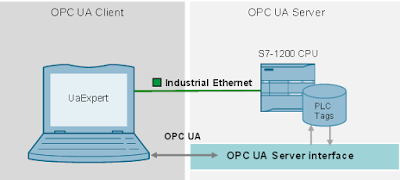
Modeling the S7-1200 OPC UA Server interface in TIA Portal
OPC UA communication is supported on S7-1200 CPUs with
firmware version 4.4 or higher.
The CPU enables data access by supporting configuration
as an OPC UA Server.
The S7-1200 OPC UA Server does not support the standard
SIMATIC server interface.
The PLC tags are made visible for OPC UA clients via
a modeled S7-1200 OPC UA server interface.

For products:6ES7215-1AG40-0XB0

= > https://support.industry.siemens.com/cs/ww/en/view/109781701


2020-11-11
ID: 109753230
Energy efficiency evaluation and media analysis
for machines with Simatic Energy Management (S7-EE Monitor)
The concept and the application examples for
the standardized efficiency evaluation of machines
according to VDMA34179 or ISO14955 allow an evaluation
of the energy efficiency of machines (all media).

For products:6ES7513-1AL00-0AB0, 6ES7211-1HD30-0XB0,...

= > https://support.industry.siemens.com/cs/ww/en/view/109753230

-----------------------------------------------------------  

2020-11-03
ID: 109772426
SIMATIC HMI Getting Starteds - Overview
This entry provides you with an overview of the
Getting Started for available SIMATIC HMI products.
The Getting Starteds offer you the opportunity
to train yourself for your SIMATIC HMI product.

For products:6AV63.1-....7-5..., 6AV210.-....6-0,...

= > https://support.industry.siemens.com/cs/ww/en/view/109772426

-----------------------------------------------------------     

2020-11-02
ID: 109783284
Siemens WW100 Weighfeeder with Integrated Sinamics
S110 CU305DP Control Module
The objective of this application guide is
to help the user become familiar with the application
commissioning and setup of the Sinamics S110 Control Unit
and WW100 Weighfeeder.
This application guide mainly focuses on the commissioning
of the Drive Unit itself.
Please refer to the BW500 Operating Instructions and
WW100 Weighfeeder Operating Instructions
for additional commissioning details.

For products:7MH7180-.....-....

= > https://support.industry.siemens.com/cs/ww/en/view/109783284

-----------------------------------------------------------   

2020-11-02
ID: 109783320
BW500, BW500/L with Siemens HMI Operator Panel
This HMI application has been designed specifically
for the Siemens BW500 and BW500/L only.
The HMI application supports a simple belt scale application,
and is a Modbus-RTU RS-485 based platform with the HMI
serving as the Modbus master.
No PLC is required for the integration and application
of the Siemens HMI Panel within this network.

For products:7MH7152-.....-...

= > https://support.industry.siemens.com/cs/ww/en/view/109783320


------------------------------------------------------------------------
#  DOWNLOAD
------------------------------------------------------------------------ 

2020-11-09
ID: 109775861
Updates for STEP 7 V16, S7-PLCSIM V16 and WinCC V16
Status 11/2020: Update 3 (PLCSIM Update 3)

For products:6ES7822-0A.06-.., 6ES7822-1A.06-..,...

= > https://support.industry.siemens.com/cs/ww/en/view/109775861

------------------------------------------------------------------------   

2020-11-02
ID: 109746530
Image downloads for HMI operator panels
Download HMI operator panel images.

For products:HMI Devices (TIA Portal)

= > https://support.industry.siemens.com/cs/ww/en/view/109746530

------------------------------------------------------------------------  

2020-11-05
ID: 109783154
Download for LOGO! 8.3 Software Upgrade
Download and installation instructions for the
LOGO! Soft Comfort Upgrade to the Version V8.3.

For products:6ED1058-0BA08-0YA1, 6ED1057-3BA01-0AA8,...

= > https://support.industry.siemens.com/cs/ww/en/view/109783154


------------------------------------------------------------------------
#  FAQ
------------------------------------------------------------------------    

2020-11-25
ID: 101094810
How do you reset a personal password in OSD if you have forgotten it, for example?
You can reset your personal password directly in OSD.

For products:3ZS1322-5CC10-0YL5, 3ZS1314-5CC10-4YA5,...

= > https://support.industry.siemens.com/cs/ww/en/view/101094810

------------------------------------------------------------------------     

2020-11-23
ID: 109783637
What action is required if the software or software license delivery
(download) was made to the wrong recipient?
Proceed as follows if your software or license order was delivered
to the wrong recipient, or if you want to reassign your software
or license delivery to another user account.

For products:3ZS1322-5CC10-0YL5, 3ZS1314-5CC10-4YA5,...

= > https://support.industry.siemens.com/cs/ww/en/view/109783637

------------------------------------------------------------------------   

2020-11-24
ID: 82212115
How do you configure and program an S7 connection and the “PUT”
and “GET” instructions for data transfer between two S7 CPUs?
You can use the S7 Communication, for example,
for data transfer via the integrated PROFINET interface
and Industrial Ethernet interface of the S7 CPUs.

For products:6GK7342-5DA01-0XE0, 6GK7342-5DF00-0XE0,...

= > https://support.industry.siemens.com/cs/ww/en/view/82212115

------------------------------------------------------------------------   

2020-11-24
ID: 109783576
When do you have to reparameterize the CBs (Communication Boards)
and CMs (Communication Modules) for point-to-point communication?
At each cold restart, you have to do a reparameterization in the S
TEP 7 (TIA Portal) user program after the power return
if the parameterization of the device configuration has been changed.

For products:6ES7241-1CH31-0XB0, 6ES7241-1CH32-0XB0,...

= > https://support.industry.siemens.com/cs/ww/en/view/109783576

------------------------------------------------------------------------  

2020-11-16
ID: 109783824
Can SITRANS Library - TIA Portal be used with S7-1200 CPUs?

For products:7MP2990-0AA00, 7ME4138-6AA00-0BB1

= > https://support.industry.siemens.com/cs/ww/en/view/109783824


------------------------------------------------------------------------
#  Manual
------------------------------------------------------------------------ 

2020-11-24
ID: 109478599
SIMATIC S7-1200/S7-1500 F-CPUs
11/2020, Product Information, A5E35635424-AJ

For products:6ES7513-1AL00-0AB0, 6ES7511-1AK00-0AB0,...

= > https://support.industry.siemens.com/cs/ww/en/view/109478599

------------------------------------------------------------------------   

2020-11-09
ID: 100782807
LOGO!Soft Comfort Online Help
10/2020, Operating Instructions

For products:6ED1055-1NB10-0BA2, 6ED1055-1MM00-0BA2,...

= > https://support.industry.siemens.com/cs/ww/en/view/100782807

------------------------------------------------------------------------   

2020-11-02
ID: 109750255
Programming Guideline Safety for SIMATIC S7-1200/1500
10/2020, Programming Manual

For products:6ES7515-2FM00-0AB0, 6ES7500-4FP00-0AB0,...

= > https://support.industry.siemens.com/cs/ww/en/view/109750255

------------------------------------------------------------------------   

2020-11-05
ID: 109783451
SIMATIC S7-1200-F EU Declaration of Confirmity
11/2020, Product Information, A5E50341520-AA

For products:6ES7226-6DA32-0XB0, 6ES7214-1AF40-0XB0,...

= > https://support.industry.siemens.com/cs/ww/en/view/109783451


------------------------------------------------------------------------
#  Certificates
------------------------------------------------------------------------ 

2020-11-09
ID: 109479573
For use in hazardous locations, IECEx, DEKRA EXAM, DMT
IECEx_DEK-15.0054X Issue 15 Certification according to
IEC regulations for SIPLUS Programmable Logic Controller Systems
DP, ET200S, ET200M, ET200MP, ET200SP, S7-1500, S7-300 and S7-1200

For products:6AG1231-5PD32-4XB0, 6AG1193-6BP20-7BB0,...

= > https://support.industry.siemens.com/cs/ww/en/view/109479573


------------------------------------------------------------------------
#  Product notes
------------------------------------------------------------------------  

2020-11-02
ID: 109782616
LOGO! Soft Comfort V8 Demo
The demo version allows to easily test and
get acquainted with LOGO! Soft Comfort.

For products:6ED1058-0CA08-0YE1, 6ED1058-0BA08-0YA1

= > https://support.industry.siemens.com/cs/ww/en/view/109782616

------------------------------------------------------------------------    

2020-11-05
ID: 109783346
Delivery release of LOGO! 8.3
The LOGO! 8.3 basic devices, LOGO! TDE and
LOGO! Soft Comfort are available immediately for delivery.

For products:6ED1057-3BA01-0AA8, 6ED1057-3BA03-0AA8,...

= > https://support.industry.siemens.com/cs/ww/en/view/109783346